Replication View tab
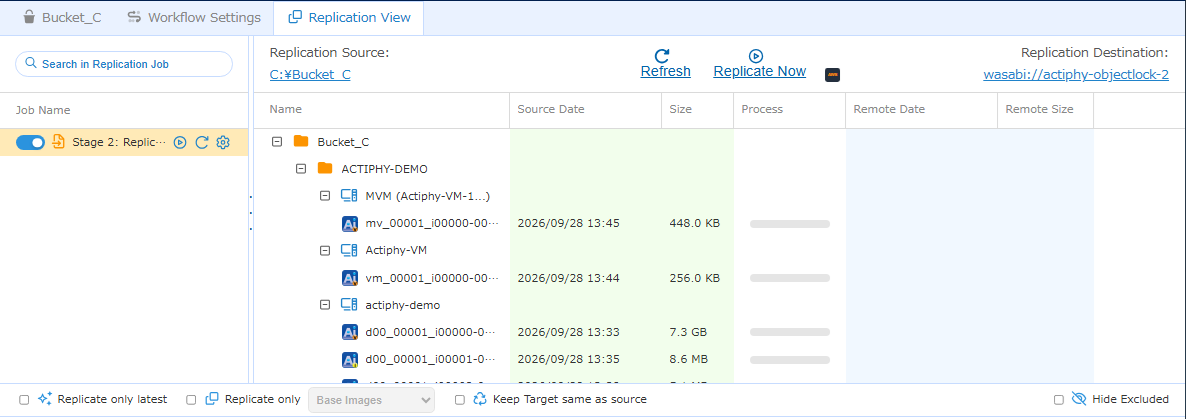
Replication View provides the following information.
Task List
The created tasks, if any, are listed here.
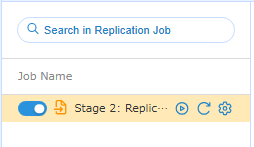
Click  to enable or disable the task schedule.
Click  to manually start Replication task.
Click  to update the item list.
Click  to edit a task.
Editing a task or enabling / disabling its schedule updates the workflow version.
Right-click a task to run the following operation.
- Run Task Immediately
- Refresh
- Edit Task
Item List
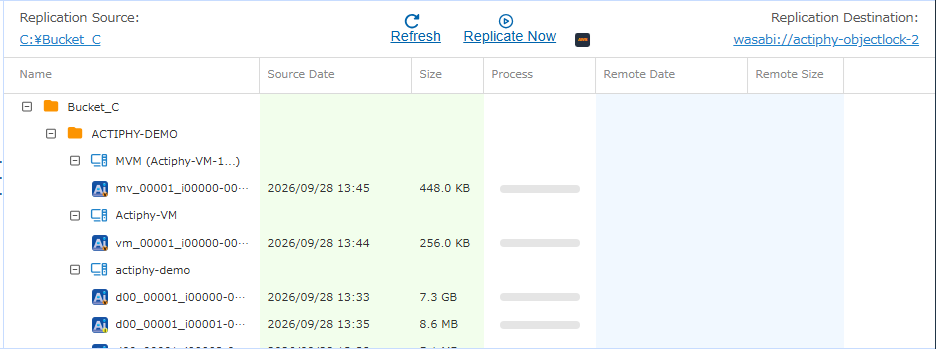
The source and target for the item selected in the [Bucket View] tab are displayed at the top, and the items to be processed are listed. Click [Run Now] to start processing.
-
Alias for Agent-Based Backup Images
Image files created with [Backup by Disk] enabled for a single disk or multiple disks are displayed in the right pane as follows.
The red highlighted area indicates the disk number, the blue highlighted area indicates the generation, and green highlighted area indicates the incremental range (end point–start point).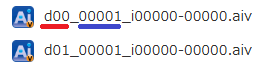
Image files created with [Backup by Disk] disabled for multiple disks are displayed in the right pane as follows.
The red highlighted area indicates that multiple disks are included, the blue highlighted area indicates the generation, and the green highlighted area indicates the incremental range (end point–start point).
-
HyperBack Image Alias
Image files are displayed in the right pane as follows.
The red highlighted area indicates that the image is for a virtual machine, the blue highlighted area indicates the generation, and the green highlighted area indicates the incremental range (end point–start point).
When created as multiple virtual machines image file (MVM), the image file is indicated in the right pane as follows. The red highlighted area indicates that the image includes multiple virtual machines, the blue highlighted area indicates the generation, and the green highlighted area indicates the incremental range (end point–start point).

Right-click the source information for an image to select [Copy to Target] or [Delete from Source]. Right-click the target information to select [Copy to Source] or [Delete from Target].
If [Enable Immutable Image] is enabled for the task, the [Retention Status] column is displayed, showing the status of the Object Lock configured for the base image file (*.AIV) of the image set, including its expiration date and mode.
Current Replication Criteria Settings
The current replication criteria settings are displayed at the bottom of the list. When the settings are changed, the profile and list are updated.
Changing the settings updates the workflow version.