安全開機
版本 7.8.1.xxxxx 或更新版本支援安全開機。
*SUSE 15.x 不支援安全開機。
在安全開機環境中,必須安裝快照驅動程式。
使用 RescueBoot 之前,必須先完成設定。
將快照驅動程式註冊至 MOK 資料庫
-
匯入公開金鑰。
# mokutil --root-pw --import /var/lib/dkms/mok.pub
僅適用於 Ubuntu。
# mokutil --import /var/lib/shim-signed/mok/mok.der
*--指定 root-pw 選項可直接使用 root 使用者。
*若未指定 root-pw 選項,系統會提示您輸入註冊用的密碼。
input password: xxxxx
input password again: xxxxx -
重新開機,並從 Shim UEFI key management 進行註冊。
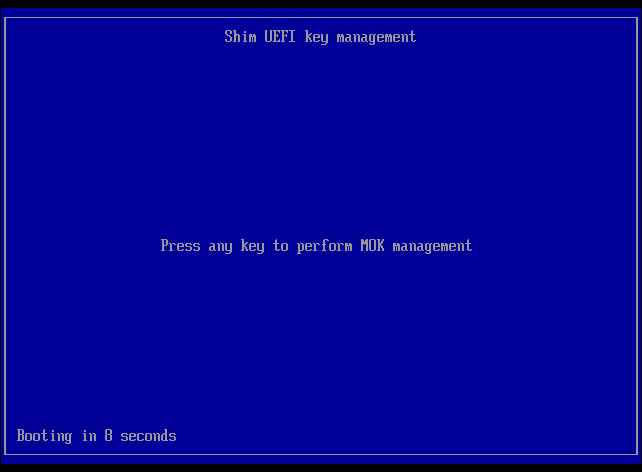
a. 在 10 秒內按任意鍵進入 MOK 管理。
b. 選取 Enroll MOK。
c. 選取 Continue。
d. 選取 Yes。
e. 在 [Password :] 視窗中輸入匯入公開金鑰時設定的密碼。
*--使用 root-pw 選項時,請輸入 root 使用者的密碼。
f. 選取 Reboot。 -
OS 啟動後,執行以下命令。如果顯示驅動程式版本,即表示驅動程式已可使用。
# cat /proc/datto-info
註冊 RescueBoot 的 MOK 資料庫
-
匯入憑證。
# mokutil --root-pw --import /opt/Actiphy/Debian13.cer
僅適用於 Ubuntu。
# mokutil --import /var/lib/shim-signed/mok/mok.der
*--指定 root-pw 選項可直接使用 root 使用者。
*若未指定 root-pw 選項,系統會提示您輸入註冊用的密碼。
input password: xxxxx
input password again: xxxxx -
重新開機,並從 Shim UEFI key management 進行註冊。
a. 在 10 秒內按任意鍵進入 MOK 管理。
b. 選取 Enroll MOK。
c. 選取 Continue。
d. 選取 Yes。
e. 在 [Password :] 視窗中輸入匯入時設定的密碼。
*--使用 root-pw 選項時,請輸入 root 使用者的密碼。
f. 選取 Reboot。 -
OS 啟動後,完成 RescueBoot 設定,並確認可以從 [GRUB Menu] — [AIPBE] 啟動。